




Top-Marken aus verschiedenen Branchen vertrauen WP Configurator, um anpassbare Produkte online zu verkaufen. Von Schuhen und Sportbekleidung bis hin zu Automobil und Bekleidung entscheiden sich unsere Kunden für WP Configurator wegen seiner Flexibilität, Zuverlässigkeit und dem konversionsorientierten Einkaufserlebnis.



























Warum ein eigenes Thema wählen für Produktanpassung?

Ein Produktkonfigurator kann die Anpassungslogik steuern, aber das Thema steuert, wie dieses Erlebnis in Ihrem Shop lebendig wird.
Das richtige Thema hilft Ihren Kunden, Produkte leichter zu entdecken, Individualisierung schneller zu verstehen und den Kaufweg mit weniger Reibung zu durchlaufen. Das ist umso wichtiger, wenn Sie personalisierte, maßgeschneiderte oder visuelle Produkte verkaufen.
Bei WP Configurator-Themen wählt man nicht einfach ein Design. Sie wählen ein Shop-Fundament, das auf Produktanpassung ausgelegt ist.
Siehe den WP Configurator Themen in Aktion
Möchten Sie schneller verstehen, wie die Themen funktionieren, bevor Sie eines auswählen? Entdecken Sie alle drei Themen-Walkthroughs, um das Setup, den Demo-Import, den Anpassungsablauf und das gesamte Ladenerlebnis zu vergleichen, bevor Sie das richtige Thema für Ihr Unternehmen auswählen.
WP Configurator Theme Tutorial: Installieren, Demos importieren und schneller bauen!
Sehen Sie, wie das Haupt-WP Configurator-Theme Ihnen hilft, das Theme zu installieren, Demos zu importieren und schnell einen individuell anpassungsbereiten Shop aufzubauen.
Möbelthema-Tutorial: Bauen Sie ein beeindruckendes interaktives Möbelgeschäft
Entdecken Sie, wie das Furniture Theme Ihnen hilft, ein Premium-Möbelgeschäft mit Demo-Import, Live-Anpassung und integrierter Konfigurator-Unterstützung zu starten.
Komponisten-Theme-Tutorial: Installieren, Demos importieren und problemlos anpassen
Entdecken Sie Composer als flexibles Mehrzweckthema mit einfacher Einrichtung, Demo-Importoptionen und einfacher visueller Anpassung.
WP Configurator Theme Tutorial: Installieren, Demos importieren und schneller bauen!
Sehen Sie, wie das Haupt-WP Configurator-Theme Ihnen hilft, das Theme zu installieren, Demos zu importieren und schnell einen individuell anpassungsbereiten Shop aufzubauen.
Möbelthema-Tutorial: Bauen Sie ein beeindruckendes interaktives Möbelgeschäft
Entdecken Sie, wie das Furniture Theme Ihnen hilft, ein Premium-Möbelgeschäft mit Demo-Import, Live-Anpassung und integrierter Konfigurator-Unterstützung zu starten.
Komponisten-Theme-Tutorial: Installieren, Demos importieren und problemlos anpassen
Entdecken Sie Composer als flexibles Mehrzweckthema mit einfacher Einrichtung, Demo-Importoptionen und einfacher visueller Anpassung.
Brauchst du etwas Individuelleres als ein Thema?
Wenn Ihr Produkt, Arbeitsablauf oder Ihr Ladenbedarf über fertige Themen hinausgehen, können wir Ihnen helfen, eine maßgeschneidertere Lösung zu entwickeln.
Verfügbar Themen
Derzeit bieten wir eine Triade von Themen an: WP Configurator – WooCommerce WordPress-Theme, Möbel-Theme, und Komponistenthema.

WP Configurator – WooCommerce WordPress-Theme
Eine starke Wahl für Marken, die ein dediziertes WooCommerce-Theme rund um konfigurierbare Produkte suchen.
Es umfasst:
-

Elementor-basiertes Thema
-
Vorinstallierter WP Configurator Pro für die Veröffentlichung von bis zu 3 Produkten
-
Neueste WordPress/PHP/WooCommerce-Versionskompatibilität
-
6 kostenlose Vorlagen/Skins, um dein Produkt stilvoll zu präsentieren
Am besten für: Allgemeine Filialen für Sonderprodukte

Möbelthema
Eine maßgeschneiderte Wahl für Möbel- und Inneneinrichtungsgeschäfte, die elegante Produktpräsentation und ein Thema wünschen, das Möbelkonfiguratoren ergänzt.
Es umfasst:
-
Elementor-basiertes Thema
-
Vorinstallierter WP Configurator Pro für die Veröffentlichung von bis zu 3 Produkten
-
Neueste WordPress/PHP/WooCommerce-Versionskompatibilität
-
3 vorinstallierte professionelle Skins: Ryota, Tailor und Vogue
Am besten für: Möbel-, Innen- und Modulgeschäfte

Komponisten-Thema
Eine flexible Multifunktionsoption für Geschäfte, die breitere Designfreiheit wünschen.
Es umfasst:
-
Visueller Komponist
-
Premium-Plugins
-
Neueste WordPress/PHP/WooCommerce-Versionskompatibilität
Am besten für: Mehrzweckgeschäfte mit breiteren Grundrissanforderungen
WP Configurator – WooCommerce WordPress-Theme
Eine starke Wahl für Marken, die ein dediziertes WooCommerce-Theme rund um konfigurierbare Produkte suchen.
Es umfasst:
-
Elementor-basiertes Thema
-
Vorinstallierter WP Configurator Pro für die Veröffentlichung von bis zu 3 Produkten
-
Neueste WordPress/PHP/WooCommerce-Versionskompatibilität
-
6 kostenlose Vorlagen/Skins, um dein Produkt stilvoll zu präsentieren
Am besten für: Allgemeine Filialen für Sonderprodukte
Möbelthema
Eine maßgeschneiderte Wahl für Möbel- und Inneneinrichtungsgeschäfte, die elegante Produktpräsentation und ein Thema wünschen, das Möbelkonfiguratoren ergänzt.
Es umfasst:
-
Elementor-basiertes Thema
-
Vorinstallierter WP Configurator Pro für die Veröffentlichung von bis zu 3 Produkten
-
Neueste WordPress/PHP/WooCommerce-Versionskompatibilität
-
3 vorinstallierte professionelle Skins: Ryota, Tailor und Vogue
Am besten für: Möbel-, Innen- und Modulgeschäfte
Komponisten-Thema
Eine flexible Multifunktionsoption für Geschäfte, die breitere Designfreiheit wünschen.
Es umfasst:
-
Visueller Komponist
-
Premium-Plugins
-
Neueste WordPress/PHP/WooCommerce-Versionskompatibilität
Am besten für: Mehrzweckgeschäfte mit breiteren Grundrissanforderungen
Thema vergleichen Optionen
Wähle das WP Configurator-Theme oder das Möbel-Theme für eine gezielte Individualisierung. Wähle Composer wegen größerer Flexibilität.
| Thema | Am besten für | Bauherr | WP Configurator Pro inbegriffen? | Enthaltene Extras | Preis |
|---|---|---|---|---|---|
| WP Configurator – WooCommerce WordPress-Theme | Allgemeine Filialen für Sonderprodukte | Elementor | Ja | Veröffentliche bis zu 3 Produkte, 6 kostenlose Skins | $99 |
| Möbelthema | Möbel-, Innen- und Modulgeschäfte | Elementor | Ja | Veröffentliche bis zu 3 Produkte, vorinstallierte professionelle Skins: Ryota, Tailor, Vogue | $99 |
| Komponist – WordPress-Thema | Mehrzweck-Schaufenster, die eine breitere Flexibilität des Layouts erfordern | Visual Compose | Nein | Premium-Plugins, Lifetime-Theme- und Plugin-Updates, keine Plugin-Lizenzen enthalten | $59 |
Was unsere Kunden sind Worte

zarbikes.com
"Bevor ich WPConfigurator benutzt habe, hatte ich Schwierigkeiten, individuelle Produkte auf meiner Website anzuzeigen, Zarbikes.com. Das WP Configurator Pro Tool hat alles verändert. Jetzt kann ich meine Produkte genau so präsentieren, wie ich möchte, und ich freue mich darauf, weitere Funktionen zu erkunden, um andere Bereiche meiner Seite zu verbessern."
Weiterlesen

sepra-solutions.com
"Das Nutzererlebnis unserer Website hat sich dank WPConfigurator dramatisch verbessert. Die Seite ist jetzt leichter zu bedienen, was unser Geschäftswachstum unterstützt hat. Wir sind sehr zufrieden damit, wie sich die Dinge entwickelt haben."
Weiterlesen
artchustudio.com
"Unsere Website hat sich deutlich verbessert, seit wir WPConfigurator nutzen. Das Einkaufserlebnis ist jetzt reibungsloser, und unsere Kunden lieben, wie einfach es ist, Produkte individuell anzupassen. Das hat für uns das Spiel verändert."
Weiterlesen
cancio.es
"Ich brauchte einen Konfigurator für einen Kunden, und WP Configurator Pro war die perfekte Wahl. Die Einrichtung war unkompliziert, und die clientseitige Benutzeroberfläche ist einfach und intuitiv. Das Endnutzererlebnis ist nahtlos, was meinen Kunden sehr zufriedenstellte."
Weiterlesen
vo2sportswear
"Einen Kit-Designer auf unserer Website hinzuzufügen hatte Priorität, aber andere Optionen waren zu teuer. WPConfigurator bot eine kosteneffiziente Lösung. Es war fantastisch, um Leads zu generieren – Kunden können mühelos individuelle Designs erstellen. Die Verwendung unserer eigenen Kleidungsmuster sorgt für genaue Vorschauen, und die Möglichkeit, Text und Bilder für Logos und Teamnummern hochzuladen, ist ein großer Bonus."
Weiterlesen
himandi.rs
"WPConfigurator hat es meinen Kunden viel leichter gemacht, meine Produkte zu verstehen. Die klaren und einfachen Beschreibungen haben mir sehr geholfen und sich positiv auf mein Geschäft ausgewirkt."
Weiterlesen
dansk-rideudstyr.dk
"Mit WPConfigurator konnten wir unsere Produkte effektiver präsentieren. Die Website ist jetzt benutzerfreundlicher, und das verbesserte Erlebnis hat direkt zu einem Anstieg der Verkaufszahlen beigetragen. Wir könnten mit dem Ergebnis nicht zufriedener sein."
Weiterlesen
momiheadmade.com
"Wir verwenden WPConfigurator, um Taschen für unsere Kunden individuell anzupassen, und es ist ein fantastisches Produktkonfigurator-Werkzeug. Sie ist einfach zu bedienen und passt perfekt zu unseren Bedürfnissen. Das hat einen großen Unterschied für unser Geschäft gemacht."
Weiterlesen
farmyth.com
"Wir können unserem Kunden ein besseres Einkaufserlebnis bieten."
Weiterlesen
olijo.com
"Der Verkauf personalisierter Produkte wurde mit WPConfigurator viel einfacher. Unsere Website ist jetzt funktionaler und benutzerfreundlicher, und Kunden schätzen die Anpassungsmöglichkeiten sehr. Das war eine großartige Bereicherung für unser Geschäft."
Weiterlesen
Platex.com
"Unseren Kunden eine einfache Individualisierung eines Produkts anbieten zu können. Mit Funktionen, um das tatsächliche Aussehen des Produkts und die Kosten zu sehen. Dadurch wurde eine neue Geschäftsnische eröffnet und der Umsatz gesteigert."
Weiterlesen
easytags
"Umsatzsteigerung und erhöhte Kundenbindung."

dantebrtoni.com
"Es ermöglichte uns, unseren Kunden klar und innovativ zu zeigen, was sie haben sollten."
Weiterlesen
"Großartige Unterstützung, schnelle Antworten und sehr entgegenkommend! Ich habe den Konfigurator ausprobiert, und es ist ein absolut fantastisches Werkzeug. Leider hat es für meinen speziellen Anwendungsfall nicht funktioniert, aber ich habe sofort eine Rückerstattung erhalten. Das Support-Team war schnell, freundlich, zuverlässig und sehr professionell. Sehr zu empfehlen!"
Weiterlesen

"Großartiger Support und Reaktionszeit, ich habe das Plugin im Dezember 2024 gekauft und hatte viele Probleme damit. Es könnte an meinem Setup liegen oder dass ich mitten in einer Update-Phase für WooCommerce, WordPress usw. gekauft habe. Sie haben mir sehr geholfen und waren herausragend, was Unterstützung und detaillierte Antworten angeht. Leider konnten wir keine Lösung finden, die funktionierte, denn wenn etwas behoben war, trat das nächste Problem auf. Sie haben mir das Geld zurückerstattet, nachdem sie (und ich) versucht hatten, die Probleme zu lösen. Ich bin ein bisschen traurig, weil das Plugin wirklich großartig aussieht und alles tut, was ich brauche. 5 Sterne für den harten Einsatz, mir zu helfen!"
Weiterlesen
"Außergewöhnliches Werkzeug zur Produktanpassung – WP Configurator Review Ich bin kürzlich auf WP Configurator gestoßen, als ich online nach einem zuverlässigen Produktkonfigurator gesucht habe, und ich muss sagen, er ist ein echter Wendepunkt! Das Tool ist unglaublich benutzerfreundlich und ermöglichte es mir, Produkte mit nur wenigen Klicks genau nach Belieben anzupassen. Die Benutzeroberfläche ist intuitiv und macht es selbst jemandem mit minimalen technischen Fähigkeiten wie mir leicht, sich effektiv zu orientieren und zu nutzen."
Weiterlesen
"WPConfigurator ist ein unglaubliches Produktkonfigurations-Plugin und eine Plattform. Du kannst eine super professionell aussehende Konfiguration schaffen. Das Support-Team ist reaktionsschnell und jederzeit bereit, Ihnen bei der Lösung zu helfen. Ich kann WPConfigurator und ihr freundliches und kompetentes Support-Team sehr empfehlen."
Weiterlesen
"Ich hatte ein Problem mit der WooCommerce-Bestellung eines Konfigurator-Produkts und obwohl sie diese Funktion noch nicht hatten, haben sie ein kleines Skript erstellt, das ich meiner Seite hinzufügen konnte, was mir enorm geholfen hat. Vielen Dank an das wunderbare Team von Configurator Pro!"
Weiterlesen
"Dieses Plugin bedeutet viel für mein Projekt. Ich hatte ein Problem und sie haben einen Weg gefunden, es zu lösen... obwohl wir lange daran gearbeitet haben. Aber die Idee war immer, den besten Weg zu finden, eine Lösung für das laufende Projekt zu bieten und zum Nutzen der Kunden live zu gehen. Ich bin dankbar für diese Mühe. Dieses Plugin bedeutet mir viel für mein Projekt. Ich hatte ein Problem und sie haben einen Weg gefunden, es zu lösen... obwohl wir lange daran gearbeitet haben. Aber die Idee war immer, den besten Weg zu finden, eine Lösung für das laufende Projekt zu bieten und zum Nutzen der Kunden live zu gehen. Ich bin dankbar für diese Mühe."
Weiterlesen
"Ich benutze WPConfigurator, und ehrlich gesagt ist es großartig. Es ist wirklich einfach einzurichten, und man kann so ziemlich alles anpassen. Wann immer ich Hilfe gebraucht habe, hat das Support-Team schnell reagiert. Wenn du ein solides Werkzeug für Produktkonfiguratoren brauchst, ist dieses hier ein Volltreffer."
Weiterlesen
"Ich benutze die wpconfigurator-Software seit 4 Jahren und bin wirklich zufrieden mit dem Support und dem Plugin, danke wpconfigurator Team!"
Weiterlesen
"Ich bin wirklich zufrieden mit der Qualität und dem Preis dieses großartigen Plugins. Ist der intuitivste Produktkonfigurator auf dem Markt. Danke, WPConfigurator-Team!"
Weiterlesen
"Bestes WordPress-Konfigurator-Plugin Nach mehreren Ausprobieren von Konfigurator-Plugins kann ich mit Sicherheit sagen, dass WPConfigurator das beste von allen ist. Die nahtlose Integration mit WooCommerce und die benutzerfreundliche Benutzeroberfläche machen die Individualisierung zum Kinderspiel. Das Support-Team ist außergewöhnlich und hat sogar alles gegeben (aber sie haben ein oder zwei Tage lang behoben, um das Problem zu beheben; meiner Erfahrung nach verursacht das meist Probleme andere Plugins). WPConfigurator ist die ultimative Wahl, wenn du einen Konfigurator für WordPress brauchst."
Weiterlesen
zarbikes.com
"Bevor ich WPConfigurator benutzt habe, hatte ich Schwierigkeiten, individuelle Produkte auf meiner Website anzuzeigen, Zarbikes.com. Das WP Configurator Pro Tool hat alles verändert. Jetzt kann ich meine Produkte genau so präsentieren, wie ich möchte, und ich freue mich darauf, weitere Funktionen zu erkunden, um andere Bereiche meiner Seite zu verbessern."
Weiterlesen
sepra-solutions.com
"Das Nutzererlebnis unserer Website hat sich dank WPConfigurator dramatisch verbessert. Die Seite ist jetzt leichter zu bedienen, was unser Geschäftswachstum unterstützt hat. Wir sind sehr zufrieden damit, wie sich die Dinge entwickelt haben."
Weiterlesen
artchustudio.com
"Unsere Website hat sich deutlich verbessert, seit wir WPConfigurator nutzen. Das Einkaufserlebnis ist jetzt reibungsloser, und unsere Kunden lieben, wie einfach es ist, Produkte individuell anzupassen. Das hat für uns das Spiel verändert."
Weiterlesen
cancio.es
"Ich brauchte einen Konfigurator für einen Kunden, und WP Configurator Pro war die perfekte Wahl. Die Einrichtung war unkompliziert, und die clientseitige Benutzeroberfläche ist einfach und intuitiv. Das Endnutzererlebnis ist nahtlos, was meinen Kunden sehr zufriedenstellte."
Weiterlesen
vo2sportswear
"Einen Kit-Designer auf unserer Website hinzuzufügen hatte Priorität, aber andere Optionen waren zu teuer. WPConfigurator bot eine kosteneffiziente Lösung. Es war fantastisch, um Leads zu generieren – Kunden können mühelos individuelle Designs erstellen. Die Verwendung unserer eigenen Kleidungsmuster sorgt für genaue Vorschauen, und die Möglichkeit, Text und Bilder für Logos und Teamnummern hochzuladen, ist ein großer Bonus."
Weiterlesen
himandi.rs
"WPConfigurator hat es meinen Kunden viel leichter gemacht, meine Produkte zu verstehen. Die klaren und einfachen Beschreibungen haben mir sehr geholfen und sich positiv auf mein Geschäft ausgewirkt."
Weiterlesen
dansk-rideudstyr.dk
"Mit WPConfigurator konnten wir unsere Produkte effektiver präsentieren. Die Website ist jetzt benutzerfreundlicher, und das verbesserte Erlebnis hat direkt zu einem Anstieg der Verkaufszahlen beigetragen. Wir könnten mit dem Ergebnis nicht zufriedener sein."
Weiterlesen
momiheadmade.com
"Wir verwenden WPConfigurator, um Taschen für unsere Kunden individuell anzupassen, und es ist ein fantastisches Produktkonfigurator-Werkzeug. Sie ist einfach zu bedienen und passt perfekt zu unseren Bedürfnissen. Das hat einen großen Unterschied für unser Geschäft gemacht."
Weiterlesen
farmyth.com
"Wir können unserem Kunden ein besseres Einkaufserlebnis bieten."
Weiterlesen
olijo.com
"Der Verkauf personalisierter Produkte wurde mit WPConfigurator viel einfacher. Unsere Website ist jetzt funktionaler und benutzerfreundlicher, und Kunden schätzen die Anpassungsmöglichkeiten sehr. Das war eine großartige Bereicherung für unser Geschäft."
Weiterlesen
Platex.com
"Unseren Kunden eine einfache Individualisierung eines Produkts anbieten zu können. Mit Funktionen, um das tatsächliche Aussehen des Produkts und die Kosten zu sehen. Dadurch wurde eine neue Geschäftsnische eröffnet und der Umsatz gesteigert."
Weiterlesen
easytags
"Umsatzsteigerung und erhöhte Kundenbindung."
dantebrtoni.com
"Es ermöglichte uns, unseren Kunden klar und innovativ zu zeigen, was sie haben sollten."
Weiterlesen
"Großartige Unterstützung, schnelle Antworten und sehr entgegenkommend! Ich habe den Konfigurator ausprobiert, und es ist ein absolut fantastisches Werkzeug. Leider hat es für meinen speziellen Anwendungsfall nicht funktioniert, aber ich habe sofort eine Rückerstattung erhalten. Das Support-Team war schnell, freundlich, zuverlässig und sehr professionell. Sehr zu empfehlen!"
Weiterlesen
"Großartiger Support und Reaktionszeit, ich habe das Plugin im Dezember 2024 gekauft und hatte viele Probleme damit. Es könnte an meinem Setup liegen oder dass ich mitten in einer Update-Phase für WooCommerce, WordPress usw. gekauft habe. Sie haben mir sehr geholfen und waren herausragend, was Unterstützung und detaillierte Antworten angeht. Leider konnten wir keine Lösung finden, die funktionierte, denn wenn etwas behoben war, trat das nächste Problem auf. Sie haben mir das Geld zurückerstattet, nachdem sie (und ich) versucht hatten, die Probleme zu lösen. Ich bin ein bisschen traurig, weil das Plugin wirklich großartig aussieht und alles tut, was ich brauche. 5 Sterne für den harten Einsatz, mir zu helfen!"
Weiterlesen
"Außergewöhnliches Werkzeug zur Produktanpassung – WP Configurator Review Ich bin kürzlich auf WP Configurator gestoßen, als ich online nach einem zuverlässigen Produktkonfigurator gesucht habe, und ich muss sagen, er ist ein echter Wendepunkt! Das Tool ist unglaublich benutzerfreundlich und ermöglichte es mir, Produkte mit nur wenigen Klicks genau nach Belieben anzupassen. Die Benutzeroberfläche ist intuitiv und macht es selbst jemandem mit minimalen technischen Fähigkeiten wie mir leicht, sich effektiv zu orientieren und zu nutzen."
Weiterlesen
"WPConfigurator ist ein unglaubliches Produktkonfigurations-Plugin und eine Plattform. Du kannst eine super professionell aussehende Konfiguration schaffen. Das Support-Team ist reaktionsschnell und jederzeit bereit, Ihnen bei der Lösung zu helfen. Ich kann WPConfigurator und ihr freundliches und kompetentes Support-Team sehr empfehlen."
Weiterlesen
"Ich hatte ein Problem mit der WooCommerce-Bestellung eines Konfigurator-Produkts und obwohl sie diese Funktion noch nicht hatten, haben sie ein kleines Skript erstellt, das ich meiner Seite hinzufügen konnte, was mir enorm geholfen hat. Vielen Dank an das wunderbare Team von Configurator Pro!"
Weiterlesen
"Dieses Plugin bedeutet viel für mein Projekt. Ich hatte ein Problem und sie haben einen Weg gefunden, es zu lösen... obwohl wir lange daran gearbeitet haben. Aber die Idee war immer, den besten Weg zu finden, eine Lösung für das laufende Projekt zu bieten und zum Nutzen der Kunden live zu gehen. Ich bin dankbar für diese Mühe. Dieses Plugin bedeutet mir viel für mein Projekt. Ich hatte ein Problem und sie haben einen Weg gefunden, es zu lösen... obwohl wir lange daran gearbeitet haben. Aber die Idee war immer, den besten Weg zu finden, eine Lösung für das laufende Projekt zu bieten und zum Nutzen der Kunden live zu gehen. Ich bin dankbar für diese Mühe."
Weiterlesen
"Ich benutze WPConfigurator, und ehrlich gesagt ist es großartig. Es ist wirklich einfach einzurichten, und man kann so ziemlich alles anpassen. Wann immer ich Hilfe gebraucht habe, hat das Support-Team schnell reagiert. Wenn du ein solides Werkzeug für Produktkonfiguratoren brauchst, ist dieses hier ein Volltreffer."
Weiterlesen
"Ich benutze die wpconfigurator-Software seit 4 Jahren und bin wirklich zufrieden mit dem Support und dem Plugin, danke wpconfigurator Team!"
Weiterlesen
"Ich bin wirklich zufrieden mit der Qualität und dem Preis dieses großartigen Plugins. Ist der intuitivste Produktkonfigurator auf dem Markt. Danke, WPConfigurator-Team!"
Weiterlesen
"Bestes WordPress-Konfigurator-Plugin Nach mehreren Ausprobieren von Konfigurator-Plugins kann ich mit Sicherheit sagen, dass WPConfigurator das beste von allen ist. Die nahtlose Integration mit WooCommerce und die benutzerfreundliche Benutzeroberfläche machen die Individualisierung zum Kinderspiel. Das Support-Team ist außergewöhnlich und hat sogar alles gegeben (aber sie haben ein oder zwei Tage lang behoben, um das Problem zu beheben; meiner Erfahrung nach verursacht das meist Probleme andere Plugins). WPConfigurator ist die ultimative Wahl, wenn du einen Konfigurator für WordPress brauchst."
Weiterlesen
Richte es auf Nur 4 Schritte
Der Installationsweg ist einfach: Installieren Sie das Theme und die erforderlichen Plugins, aktivieren Sie Ihre Lizenz, importieren Sie Demo-Inhalte und beginnen Sie mit der Produktanpassung. Es stehen mehrere Installationsmöglichkeiten zur Verfügung, darunter WordPress-Dashboard-Installation, FTP und cPanel.
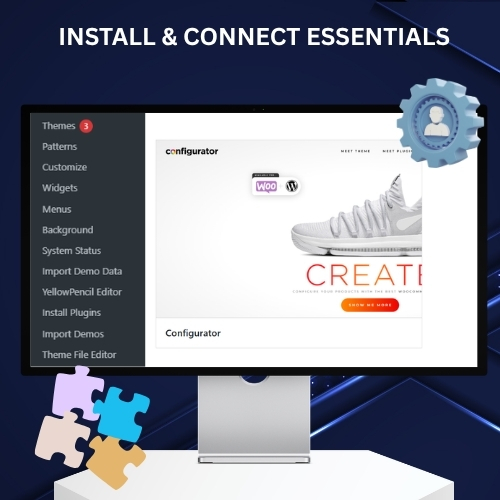
Installiere dein Theme und die erforderlichen Plugins
Lade dein ausgewähltes Theme hoch und aktiviere es mit der Methode, die zu deinem Workflow passt. Erledige die Plugin-Einrichtung, damit Theme- und Konfiguratorfunktionen richtig zusammenarbeiten.
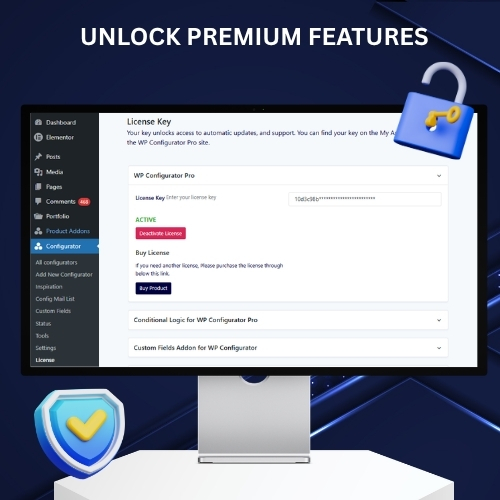
Aktivieren Sie Ihre Lizenz
Kopiere den Schlüssel aus deinem Konto-Dashboard und aktiviere ihn in WordPress unter Konfigurator > Einstellungen > Lizenz-Reiter.
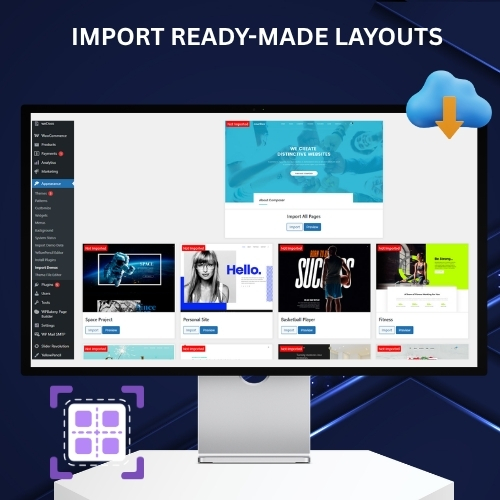
Importiere Demo-Inhalte
Wenden Sie ein fertiges Layout schneller an und nutzen Sie es als Ausgangspunkt.
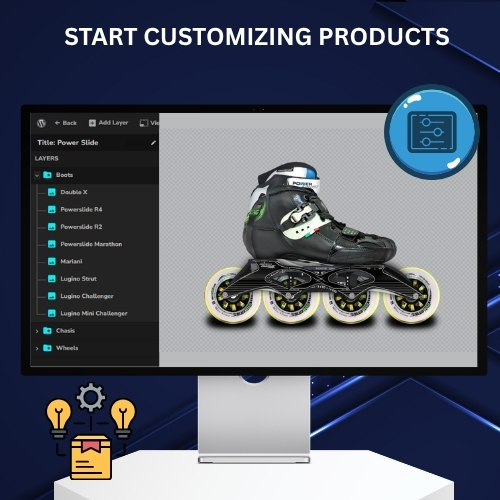
Start-Anpassung
Gehen Sie in die Produktanpassung, sobald die Grundstruktur vorhanden ist.
Installiere dein Theme und die erforderlichen Plugins
Lade dein ausgewähltes Theme hoch und aktiviere es mit der Methode, die zu deinem Workflow passt. Erledige die Plugin-Einrichtung, damit Theme- und Konfiguratorfunktionen richtig zusammenarbeiten.
Aktivieren Sie Ihre Lizenz
Kopiere den Schlüssel aus deinem Konto-Dashboard und aktiviere ihn in WordPress unter Konfigurator > Einstellungen > Lizenz-Reiter.
Importiere Demo-Inhalte
Wenden Sie ein fertiges Layout schneller an und nutzen Sie es als Ausgangspunkt.
Start-Anpassung
Gehen Sie in die Produktanpassung, sobald die Grundstruktur vorhanden ist.

100% risikofreie Geldrückzahlungsgarantie
Sie sind vollständig durch unsere 100%ige Geld-zurück-Garantie geschützt. Wenn Sie innerhalb von 15 Tagen nach dem Kauf nicht vollständig zufrieden sind, können Sie gerne eine vollständige Rückerstattung erhalten.
Passe das Thema entsprechend an Ihre Marke
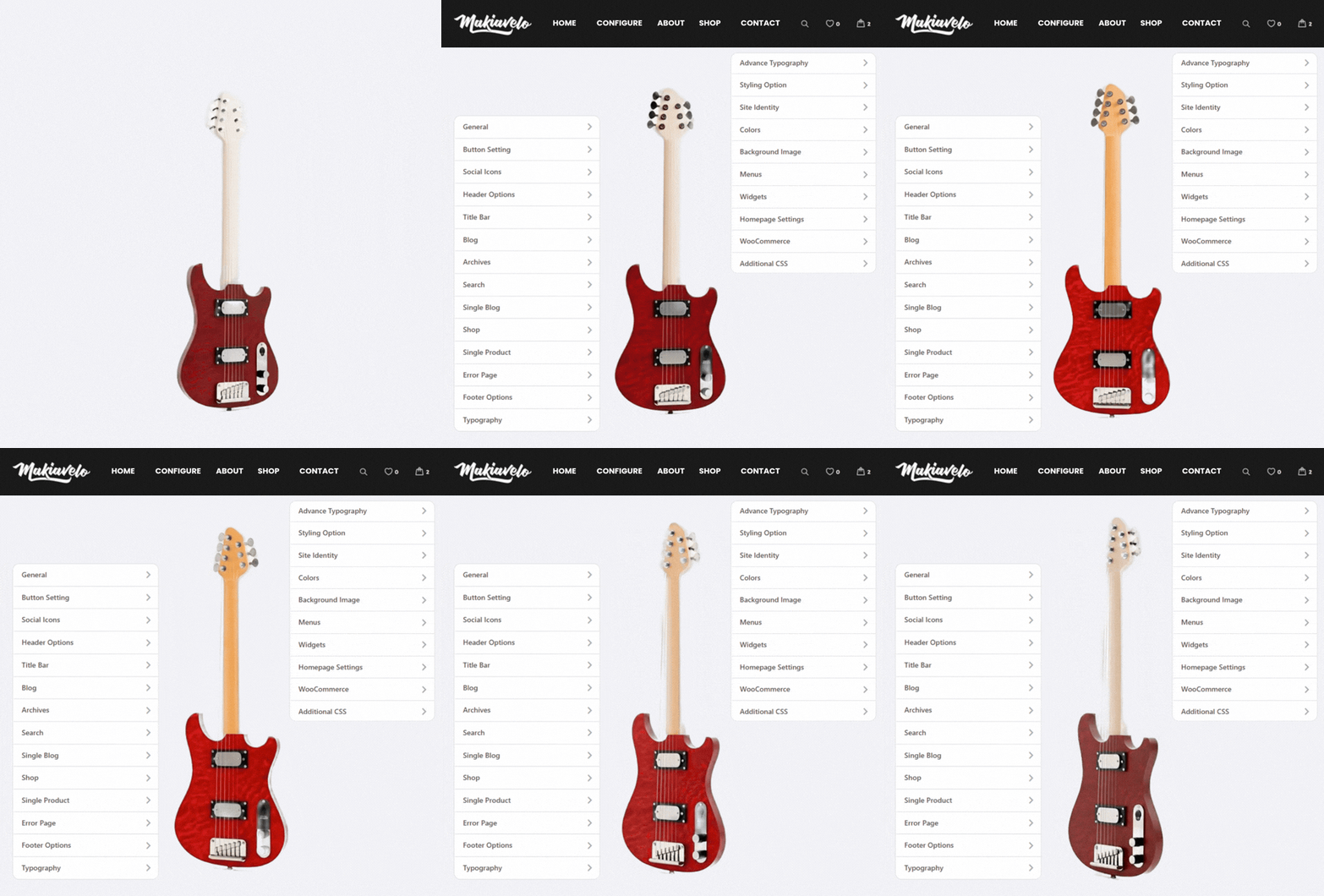
Diese WooCommerce-Konfigurator-Themes sind auf Geschwindigkeit ausgelegt, aber sie sind nicht auf einen einzigen Look festgelegt.
Erhalten Sie Anpassungsbereiche für:
-
Allgemeine Einstellungen
-
Tasteneinstellungen
-
Header-Optionen
-
Titelleiste
-
Blog- und Archiv-Settings
-
Shop-Einstellungen
-
Einstellungen für einzelne Produkte und mehr
Das gibt Ihnen Spielraum, das Storefront an Ihren Markenstil, Ihre Inhaltsstruktur und Ihren Verkaufsansatz anzupassen, ohne den Vorteil eines vorgefertigten, WooCommerce-reifen Setups zu verlieren.
Egal, ob Sie einen saubereren Katalog, stärkeres Header-Branding, besseres Button-Design oder ein ausgefeilteres Aussehen auf der Produktseite wünschen, die WP Configurator-Themen Gib deinem Geschäft eine bessere Basis, um mit der Arbeit zu beginnen.
Siehe Branchen-Anwendungsfälle
WP-Konfigurator-Themen FAQs
Was ist bei einem WP Configurator-Thema enthalten?
Die dedizierten WP Configurator Theme- und Möbel-Theme-Pakete enthalten ein WordPress-Theme, Page Builder-Unterstützung, vorinstallierten WP Configurator Pro für die Veröffentlichung von bis zu 3 Produkten sowie aktuelle WordPress/PHP/WooCommerce-Kompatibilität. Die enthaltenen Skins variieren je nach Paket. Composer Theme bietet Unterstützung für Seitenbauer, Premium-Plugins und Theme-/Plugin-Updates.
Ist WP Configurator Pro im Theme enthalten?
Das WP Configurator Theme und das Möbel-Theme werden mit vorinstalliertem WP Configurator Pro geliefert und unterstützen die Veröffentlichung von bis zu drei Produkten. Du kannst auf die lizenzierte Version des WP Configurator Pro Plugins upgraden, um unbegrenzte Produktveröffentlichungen zu ermöglichen.
Wie installiere ich WP Configurator, Furniture oder Composer Theme auf WordPress?
Gehe zu deinem WordPress-Admin-Dashboard, öffne Appearance > Themes, klicke auf Neu hinzufügen und lade die WP Configurator Theme-Datei von deinem Computer hoch.
Wie importiere ich Demo-Inhalte für das Möbelthema?
Gehe zu Aussehen, →Demos importieren , fahre mit der Maus über die verfügbare Demo und klicke auf Alle Seiten importieren. Import bringt Demo-Seiten, Menüs, Widgets, Einstellungen und sogar einen Muster-Möbel-Produktkonfigurator, sodass Sie mit einem fertigen Layout starten können.
Kann ich das Theme nach der Installation anpassen?
Ja. Anpassungsbereiche umfassen Layout, Buttons, Header, Shop-Einstellungen und einzelne Produkteinstellungen im WP Configurator Pro Theme, Möbelthema und Composer Theme.
Kann ich Demoinhalte importieren?
Ja. Der Demo-Import ist Teil des WP Configurator Theme, Furniture Theme und Composer Theme Setup.
Kann ich ein WP-Konfigurator-, Möbel- oder Komponisten-Theme per FTP installieren?
Ja. Extrahiere das Theme-Archiv, erstelle den Theme-Ordner innerhalb wp-content/themes, lade die Theme-Dateien mit einem FTP-Client hoch und aktiviere dann das Theme im Bereich Verfügbare Themes in WordPress.
Was beinhaltet der Demo-Import?
Der Demo-Import kann vorgefertigte Seiten wie Home, Shop, Blog und Contact sowie vorkonfigurierte Layouts, Menüs, Widgets und Page-Builder-Inhalte enthalten. Im Möbelthema kann auch ein Muster-Möbelkonfigurator-Setup enthalten sein.
Wie aktiviere ich die Theme- oder Plugin-Lizenz?
Holen Sie den Schlüssel aus Ihrem Konto-Dashboard ab und aktivieren Sie ihn dann in WordPress unter dem Tab Einstellungen>Lizenz in WordPress>.
Kann ich WP Configurator Pro mit einem anderen WordPress-Theme verwenden?
Ja. Auch wenn Sie eines der dedizierten Theme-Pakete nicht verwenden, ist WP Configurator Pro für alle gut programmierten WordPress-Themes geeignet.
Was sollte ich nach der Installation und Aktivierung des Themes tun?
Nach der Aktivierung installieren Sie alle erforderlichen Plugins, die auf der Theme-Seite angezeigt werden, oder über den Button Plugins installieren. Gehe dann zur Appearance>Theme-Lizenz und füge deinen gekauften Lizenzcode hinzu, um die Einrichtung abzuschließen.
Kann ich das Theme nach dem Import der Demo anpassen?
Ja. Es gibt viele Bereiche, die in WP Configurator-Themen individuell angepasst werden können. Es enthält allgemeine Einstellungen, Button-Einstellungen, Header-Optionen, Footer-Optionen, Typografie, Styling, WooCommerce-Einstellungen und zusätzliches CSS.