
































Confiados por miles, impulsados por los resultados, Construido para satisfacer

0
Confiados por 8.000+ marcas innovadoras
Las principales empresas tecnológicas confían en WP Configurator para ofrecer una personalización de productos fluida y dinámica a gran escala.

0
Crecimiento del 250% en eficiencia de ventas
Empodera experiencias de compra más inteligentes — impulsa hasta un 250% más de conversiones con personalización interactiva e en tiempo real.

0
Reducción del 90% en las tasas de reembolso
WP Configurator reduce los reembolsos al permitir a los clientes visualizar y personalizar sus compras con precisión.
User Experience & Customization
A better frontend experience keeps customers engaged and helps them finish the purchase.

Improved User Interface
What it does: Modern, intuitive layout
Por qué es importante: Keeps users engaged and increases conversions

Selector de colores
What it does: Change material colors instantly
Por qué es importante: Makes customization fast and interactive

Intercambio de materiales basado en capas
What it does: Swap materials per product layer
Por qué es importante: Structured and flexible customization
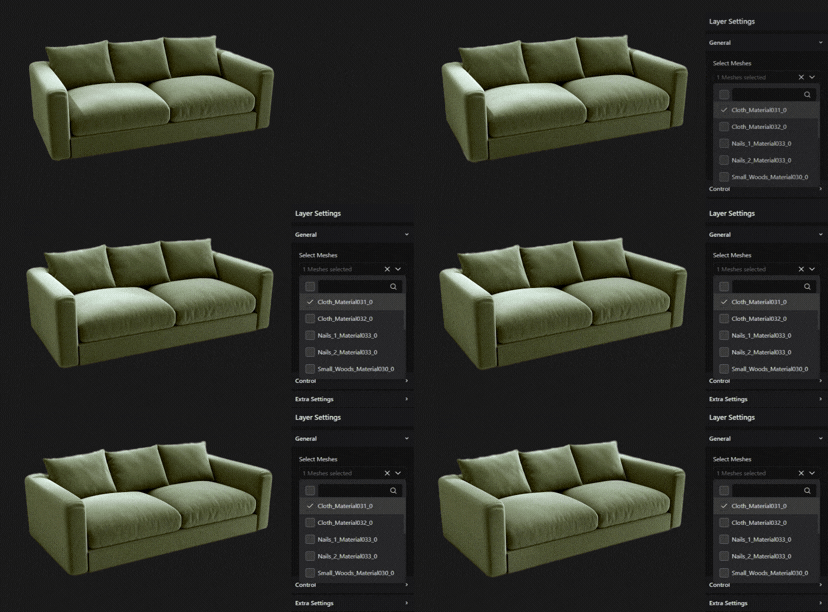
Intercambio de mallas
What it does: Replace entire product parts
Por qué es importante: Create multiple product variations from one base model
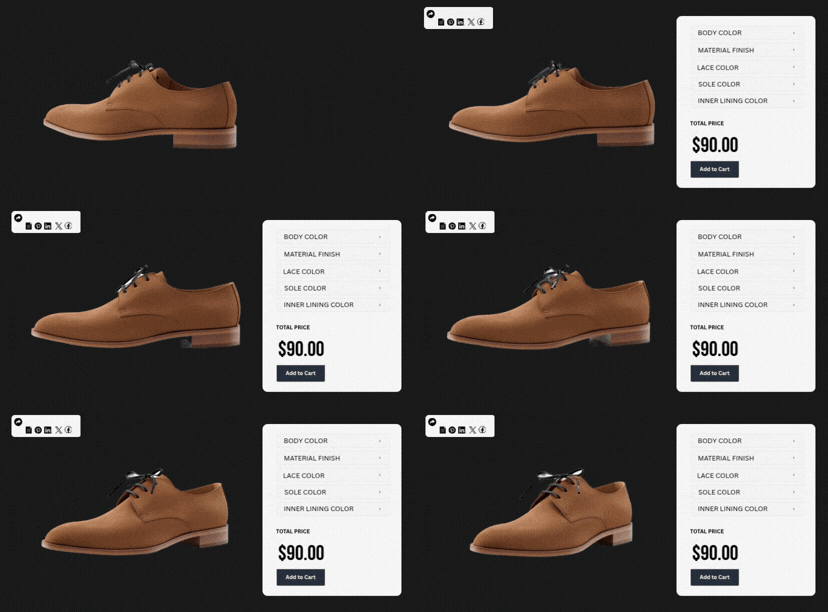
Share Configuration
What it does: Share the configured product via a link
Por qué es importante: Easy collaboration and faster purchase decisions

Modular Interface Setting
What it does: enable only the required features
Por qué es importante: Speed optimization, cleaner backend, easier debugging

Próximamente
Product Inspiration
What it does: Preset designs and guided suggestions
Por qué es importante: Helps customers choose faster and boosts AOV

Próximamente
Realidad Aumentada (RA)
What it does: View product in a real-world environment
Por qué es importante: Increases buying confidence and reduces returns
Improved User Interface
What it does: Modern, intuitive layout
Por qué es importante: Keeps users engaged and increases conversions
Selector de colores
What it does: Change material colors instantly
Por qué es importante: Makes customization fast and interactive
Intercambio de materiales basado en capas
What it does: Swap materials per product layer
Por qué es importante: Structured and flexible customization
Intercambio de mallas
What it does: Replace entire product parts
Por qué es importante: Create multiple product variations from one base model
Share Configuration
What it does: Share the configured product via a link
Por qué es importante: Easy collaboration and faster purchase decisions
Modular Interface Setting
What it does: enable only the required features
Por qué es importante: Speed optimization, cleaner backend, easier debugging
Próximamente
Product Inspiration
What it does: Preset designs and guided suggestions
Por qué es importante: Helps customers choose faster and boosts AOV
Próximamente
Realidad Aumentada (RA)
What it does: View product in a real-world environment
Por qué es importante: Increases buying confidence and reduces returns
Smart Pricing & Revenue Growth
Make pricing transparent while customers configure — so they don’t hesitate at checkout.

Real-Time Pricing
What it does: Instantly updates price as selections change
Por qué es importante: Builds pricing transparency and trust

Layer-Based Pricing
What it does: Calculates price per selected layer
Por qué es importante: Accurate and scalable pricing control

Precios basados en rango y fórmulas
What it does: Dynamic pricing using custom rules
Por qué es importante: Ideal for complex and made-to-measure products
Próximamente
Real-Time Pricing
What it does: Instantly updates price as selections change
Por qué es importante: Builds pricing transparency and trust
Layer-Based Pricing
What it does: Calculates price per selected layer
Por qué es importante: Accurate and scalable pricing control
Precios basados en rango y fórmulas
What it does: Dynamic pricing using custom rules
Por qué es importante: Ideal for complex and made-to-measure products
Próximamente
Launch Your 3D Product Configurator for WooCommerce in Days
You don’t need months of development to launch a working 3D configuration flow inside WordPress.
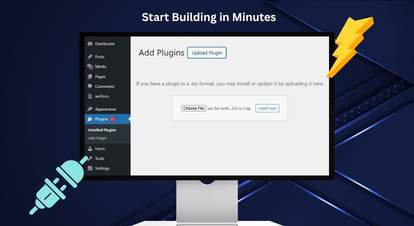
Install & Activate WP 3D Configurator
Upload the plugin ZIP from WordPress → Plugins, or upload via FTP. Activate it and you’ll see a new “3D Configurator” menu in your WordPress dashboard.
You’re now ready to create your first configurator.
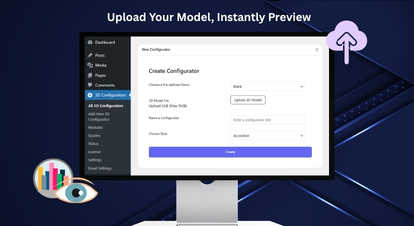
Create a New 3D Configurator (Upload GLB)
Click Add New 3D Configurator and upload your GLB model (required). Add a configurator name and generate the configurator.
Tip: GLB is recommended because it packs model + textures into a single file.
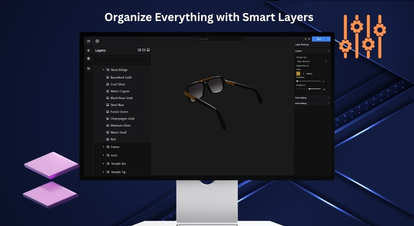
Build Your Options (Layers + Meshes + Controls)
Use the Layers panel to create groups, sub-groups, and option layers. Assign meshes to options and use icons/labels to define how choices appear on the frontend.
Add descriptions for clarity, and keep the experience intuitive.
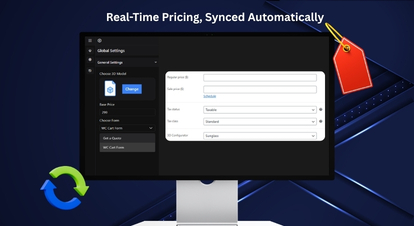
Connect WooCommerce + Configure Pricing
Choose the WooCommerce product and set a base price in Global Settings. Enable Real-Time Pricing y Layer-Based Pricing as needed.
Configurar currency settings globally so all configurators stay consistent.
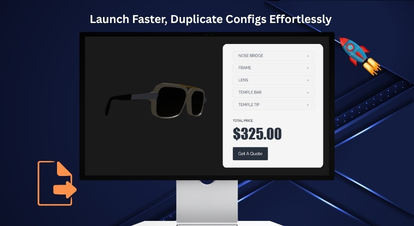
Publish, Test, and Scale with Import/Export
Publish your configurator and validate the flow end-to-end (Configure → Cart → Checkout). Uso Export (JSON/ZIP) to save configurators and Import to reuse them across sites.
This is the fastest way to launch new products without rebuilding from scratch.
Install & Activate WP 3D Configurator
Upload the plugin ZIP from WordPress → Plugins, or upload via FTP. Activate it and you’ll see a new “3D Configurator” menu in your WordPress dashboard.
You’re now ready to create your first configurator.
Create a New 3D Configurator (Upload GLB)
Click Add New 3D Configurator and upload your GLB model (required). Add a configurator name and generate the configurator.
Tip: GLB is recommended because it packs model + textures into a single file.
Build Your Options (Layers + Meshes + Controls)
Use the Layers panel to create groups, sub-groups, and option layers. Assign meshes to options and use icons/labels to define how choices appear on the frontend.
Add descriptions for clarity, and keep the experience intuitive.
Connect WooCommerce + Configure Pricing
Choose the WooCommerce product and set a base price in Global Settings. Enable Real-Time Pricing y Layer-Based Pricing as needed.
Configurar currency settings globally so all configurators stay consistent.
Publish, Test, and Scale with Import/Export
Publish your configurator and validate the flow end-to-end (Configure → Cart → Checkout). Uso Export (JSON/ZIP) to save configurators and Import to reuse them across sites.
This is the fastest way to launch new products without rebuilding from scratch.
Need help? Our team can guide your setup and best-practice configuration.
Habla con nuestros expertosWooCommerce 3D Product Configurator — No Separate Dashboards. No Per-Seat Pricing. No Add-On Dependency.
WP 3D Configurator is designed to run directly inside WordPress and connect with WooCommerce for a seamless purchase flow.

Obtener una integración de presupuesto
Turn configured builds into quote requests — ideal for high-value and B2B inquiries. Capture requirements in a structured format so your sales team can respond faster.

Integración de WooCommerce
Sync configurations with cart and checkout – so buying stays frictionless. Let customers complete purchases without leaving the WooCommerce experience.

Integración del Formulario de Contacto 7
Capture leads directly inside WordPress — without extra tools or complex setup. Collect key details alongside the configuration to qualify inquiries efficiently.
Obtener una integración de presupuesto
Turn configured builds into quote requests — ideal for high-value and B2B inquiries. Capture requirements in a structured format so your sales team can respond faster.
Integración de WooCommerce
Sync configurations with cart and checkout – so buying stays frictionless. Let customers complete purchases without leaving the WooCommerce experience.
Integración del Formulario de Contacto 7
Capture leads directly inside WordPress — without extra tools or complex setup. Collect key details alongside the configuration to qualify inquiries efficiently.
A 3D Product Configurator Pro for WooCommerce Across Industries
WP Configurator fits any WooCommerce store selling products with multiple choices, upgrades, or components.
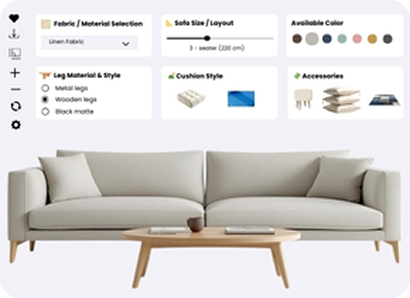
Furniture & Home (modules, fabrics, finishes)
Let shoppers configure modules, fabrics, finishes, and layouts before they buy.
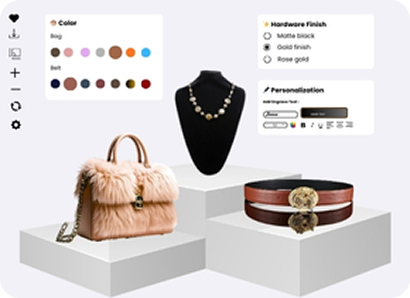
Fashion & Luxury (materials, stitching, monograms)
Offer material, stitching, and monogram choices with a premium, guided customization flow.
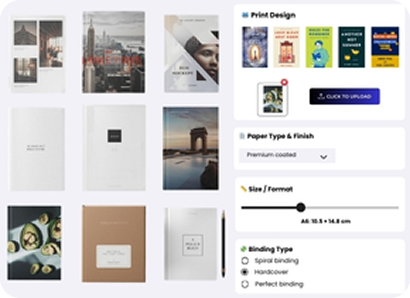
Printing (proofs, uploads, variations)
Capture uploads, proofs, and variation details cleanly — so every order is production-ready.
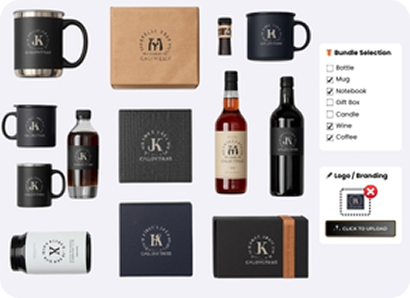
Gadget & Gifting (logos, engraving, bundles)
Enable logos, engraving, and bundles while keeping personalization simple at checkout.
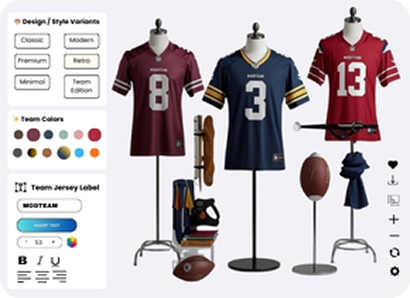
Sports & Fitness (components, sizing, accessories)
Sell size, components, and add-ons with compatibility rules to prevent wrong builds.
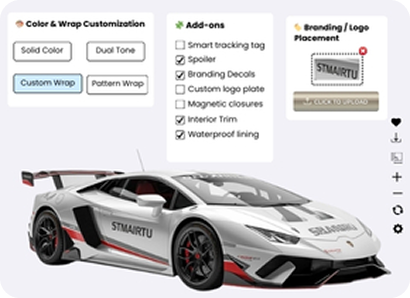
Automotive Accessories (trim packs, add-ons)
Configure trims, upgrades, and add-ons with rule-based options and real-time pricing.
Furniture & Home (modules, fabrics, finishes)
Let shoppers configure modules, fabrics, finishes, and layouts before they buy.
Fashion & Luxury (materials, stitching, monograms)
Offer material, stitching, and monogram choices with a premium, guided customization flow.
Printing (proofs, uploads, variations)
Capture uploads, proofs, and variation details cleanly — so every order is production-ready.
Gadget & Gifting (logos, engraving, bundles)
Enable logos, engraving, and bundles while keeping personalization simple at checkout.
Sports & Fitness (components, sizing, accessories)
Sell size, components, and add-ons with compatibility rules to prevent wrong builds.
Automotive Accessories (trim packs, add-ons)
Configure trims, upgrades, and add-ons with rule-based options and real-time pricing.
Ready to Launch Your 3D Product Configurator in WooCommerce?
Build interactive 3D customization experiences inside WordPress, connect them to WooCommerce, and scale faster with import/export workflows.
Admin Control & Business Growth
Run the configurator like a product — not a fragile experiment.

Error Log Dashboard
Keep your site stable with an Error Log Dashboard for fast debugging.

Optimización SEO
Improve organic visibility with SEO Optimization that links multiple products to a single configurator.

Analítica
Make smarter decisions by tracking user behavior and performance with Analytics.
Próximamente
Error Log Dashboard
Keep your site stable with an Error Log Dashboard for fast debugging.
Optimización SEO
Improve organic visibility with SEO Optimization that links multiple products to a single configurator.
Analítica
Make smarter decisions by tracking user behavior and performance with Analytics.
Próximamente
See the WooCommerce 3D Configurator Experience Live
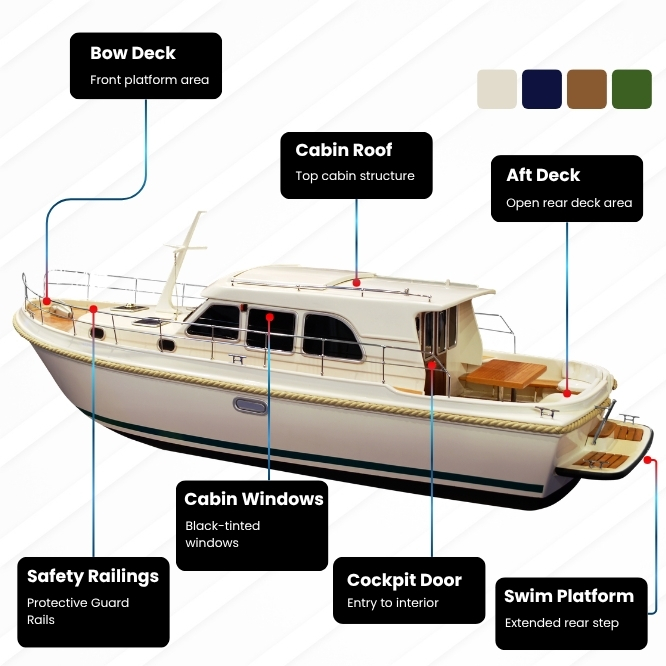
Stop guessing how it will look. See the flow your customers will use. Guided configuration steps, compatibility rules that prevent invalid builds, live pricing updates, WooCommerce add-to-cart and checkout, and more.

Garantía de devolución del dinero 100% sin riesgo
Estás completamente protegido por nuestra Garantía de Devolución del Dinero al 100%. Si no estás completamente satisfecho en los 15 días posteriores a la compra, puedes recibir un reembolso completo.
3D Product Configurator for WooCommerce FAQs
What is a 3D product configurator?
A 3D product configurator lets your customers customize a product and see changes instantly while selecting options like colors, materials, and parts. It helps customers buy complex products with more confidence.
Does it support conditional logic and advanced constraints?
Yes, it will allow you to show/hide/disable options based on rules to prevent invalid combinations and simplify the UX.
Which file format is required for the 3D configurator?
You must upload a GLB file to create a 3D configurator. PNG files are recommended for textures or overlays.
Can I use a quote flow instead of direct checkout?
Yes. The plugin supports a Get a Quote path for high-value and B2B inquiries.
Does it include stock management and analytics?
Stock Management and Analytics are coming soon as part of the 3D configurator roadmap.
What other features are expected to come in the future?
We are continuously enhancing 3D Product Configurator Pro, our state-of-the-art WooCommerce product configurator. Since its initial release, we have introduced the following features:
- Color Picker
- Download Canvas Image
- Download Summary PDF
- Swap Visibility
- Contact Form 7 Integration
- Share Functionality
- Mesh Swapping
- Conditional Logic
- Advanced 3D Controls (Rendering, Lighting, Camera, and Scene)
The following features are planned and will be released gradually in future updates:
- Augmented Reality (AR) Allow customers to visualize configured products in their real-world environment before purchasing.
- Range & Formula-Based Pricing Enable dynamic pricing calculations based on measurements, quantities, or custom formulas.
- Conditional Logic Show or hide configuration options automatically based on user selections.
- Stock Management Manage inventory for configurable components and options.
- Analytics Track user interactions, popular configurations, and customer behavior.
- Product Inspiration Presets Provide ready-made configuration templates to inspire customers and speed up the buying process.
Can I add a WooCommerce 3D product configurator to my store without coding?
Yes. WP Configurator is built for WordPress and designed to be managed from the admin dashboard with an intuitive interface.
What pricing options are supported?
Real-Time Pricing and Layer-Based Pricing are available, while Range & Formula-Based Pricing for made-to-measure and complex pricing scenarios are soon to come.
Can customers share their configuration before buying?
Yes. Share Configuration lets customers share a configured product via a link for approvals and faster decisions.
Will the configuration work with the WooCommerce cart and checkout?
Yes. WooCommerce integration enables a seamless purchase experience from configuration through checkout.
How does linking multiple WooCommerce products to a single configurator improve SEO?
Linking multiple WooCommerce products to one configurator page consolidates SEO value instead of spreading it across several separate pages. Traffic, internal links, and ranking signals from different product pages all point to the same configurator, strengthening its authority in search engines. This helps the configurator page rank higher for relevant keywords and attract more qualified organic traffic.
How is 3D Product Configurator Pro different from 2D WP Configurator Pro?
3D Product Configurator Pro is built for interactive 3D customization using GLB models, while WP Configurator 2D Pro is designed for fast visual configuration using layered images (PNGs) – ideal when you want a lightweight, quick-to-launch product customizer without 3D models.