






























Zaufany przez tysiące, napędzany wynikami, Zbudowane, by zadowolić

0
Zaufany przez 8 000+ innowacyjnych marek
Wiodące technologicznie firmy polegają na WP Configurator, aby zapewnić płynną, dynamiczną personalizację produktu na dużą skalę.

0
250% wzrost efektywności sprzedaży
Wzmocnij inteligentniejsze doświadczenia zakupowe — zwiększyj konwersje o 250% dzięki interaktywnej personalizacji w czasie rzeczywistym.

0
90% obniżka stawek zwrotów
WP Configurator ogranicza zwroty, umożliwiając klientom dokładną wizualizację i personalizację zakupów.
Użytkownik Doświadczenie i personalizacja
Lepsze doświadczenie frontendowe utrzymuje zaangażowanie klientów i pomaga dokończyć zakup.

Ulepszony interfejs użytkownika
Co robi: Nowoczesny, intuicyjny układ
Dlaczego to ważne: Utrzymuje zaangażowanie użytkowników i zwiększa konwersje

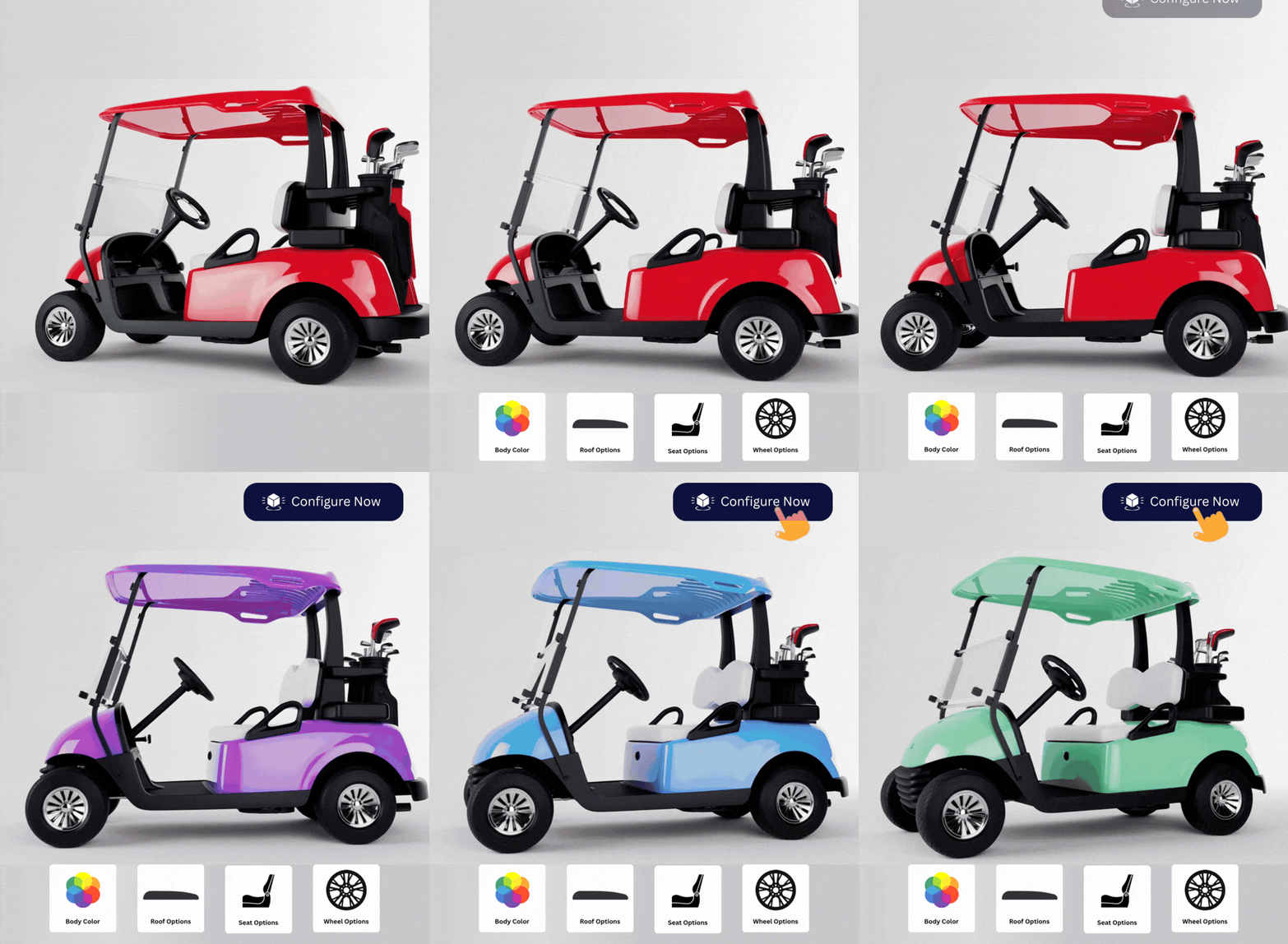
Wybór kolorów
Co robi: Natychmiast zmień kolor materiału
Dlaczego to ważne: Sprawia, że personalizacja jest szybka i interaktywna

Wymiana warstw materiału
Co robi: Materiały swap na warstwę produktu
Dlaczego to ważne: Strukturalna i elastyczna personalizacja
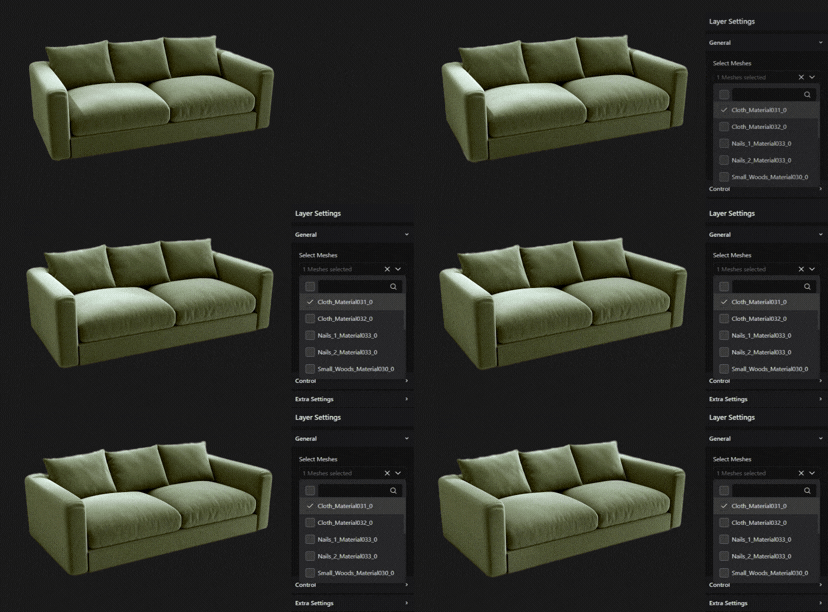
Wymiana siatek
Co robi: Wymień całe części produktu
Dlaczego to ważne: Stwórz wiele wariantów produktu na podstawie jednego modelu bazowego

Konfiguracja udziałów
Co robi: Udostępnij skonfigurowany produkt za pomocą linku
Dlaczego to ważne: Łatwa współpraca i szybsze decyzje zakupowe

Ustawienia interfejsu modułowego
Co robi: Włączaj tylko wymagane funkcje
Dlaczego to ważne: Optymalizacja szybkości, czystszy backend, łatwiejsze debugowanie

Wkrótce
Inspiracja produktem
Co robi: Gotowe projekty i sugestie z przewodnikiem
Dlaczego to ważne: Pomaga klientom szybciej wybierać i zwiększa AOV

Wkrótce
Rzeczywistość rozszerzona (AR)
Co robi: Zobacz produkt w rzeczywistym środowisku
Dlaczego to ważne: Zwiększa zaufanie do zakupów i zmniejsza zwroty
Ulepszony interfejs użytkownika
Co robi: Nowoczesny, intuicyjny układ
Dlaczego to ważne: Utrzymuje zaangażowanie użytkowników i zwiększa konwersje
Wybór kolorów
Co robi: Natychmiast zmień kolor materiału
Dlaczego to ważne: Sprawia, że personalizacja jest szybka i interaktywna
Wymiana warstw materiału
Co robi: Materiały swap na warstwę produktu
Dlaczego to ważne: Strukturalna i elastyczna personalizacja
Wymiana siatek
Co robi: Wymień całe części produktu
Dlaczego to ważne: Stwórz wiele wariantów produktu na podstawie jednego modelu bazowego
Konfiguracja udziałów
Co robi: Udostępnij skonfigurowany produkt za pomocą linku
Dlaczego to ważne: Łatwa współpraca i szybsze decyzje zakupowe
Ustawienia interfejsu modułowego
Co robi: Włączaj tylko wymagane funkcje
Dlaczego to ważne: Optymalizacja szybkości, czystszy backend, łatwiejsze debugowanie
Wkrótce
Inspiracja produktem
Co robi: Gotowe projekty i sugestie z przewodnikiem
Dlaczego to ważne: Pomaga klientom szybciej wybierać i zwiększa AOV
Wkrótce
Rzeczywistość rozszerzona (AR)
Co robi: Zobacz produkt w rzeczywistym środowisku
Dlaczego to ważne: Zwiększa zaufanie do zakupów i zmniejsza zwroty
Inteligentne wyceny i Wzrost przychodów
Spraw, by ceny były przejrzyste podczas konfiguracji klientów — aby nie wahali się przy finalizacji zamówienia.

Ceny w czasie rzeczywistym
Co robi: Natychmiast aktualizuje cenę, gdy zmieniają się wybory
Dlaczego to ważne: Buduje przejrzystość cenową i zaufanie

Ustalanie cen opartych na warstwach
Co robi: Oblicza cenę na wybraną warstwę
Dlaczego to ważne: Dokładna i skalowalna kontrola cen

Cenowanie oparte na zakresie i wzorcach
Co robi: Dynamiczne wyceny z wykorzystaniem niestandardowych reguł
Dlaczego to ważne: Idealne dla produktów złożonych i na miarę wykonywanych na miarę
Wkrótce
Ceny w czasie rzeczywistym
Co robi: Natychmiast aktualizuje cenę, gdy zmieniają się wybory
Dlaczego to ważne: Buduje przejrzystość cenową i zaufanie
Ustalanie cen opartych na warstwach
Co robi: Oblicza cenę na wybraną warstwę
Dlaczego to ważne: Dokładna i skalowalna kontrola cen
Cenowanie oparte na zakresie i wzorcach
Co robi: Dynamiczne wyceny z wykorzystaniem niestandardowych reguł
Dlaczego to ważne: Idealne dla produktów złożonych i na miarę wykonywanych na miarę
Wkrótce
Uruchom swój 3D Product Configurator dla WooCommerce w dniach
Nie potrzebujesz miesięcy rozwoju, aby uruchomić działający proces konfiguracji 3D w WordPressie.
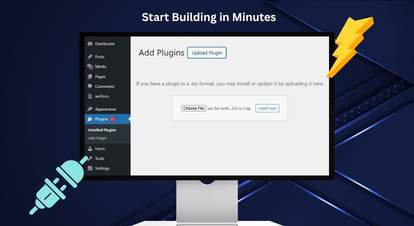
Instalacja i aktywacja WP 3D Configurator
Prześlij ZIP wtyczki z WordPress → Plugins lub przesłaj przez FTP. Aktywuj go, a zobaczysz nowy plik "3D Configurator" menu w Twoim panelu WordPress.
Jesteś już gotowy Stworzyć swój pierwszy konfigurator.
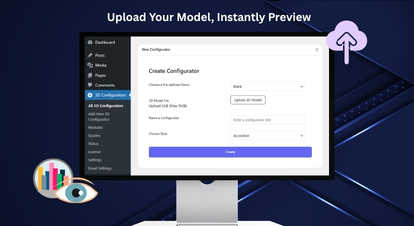
Stwórz nowy konfigurator 3D (Upload GLB)
Kliknij Dodaj nowy konfigurator 3D i przesłać swoje GLB model (wymagany). Dodaj nazwę konfiguratora i wygeneruj konfigurator.
Wskazówka: GLB jest zalecane, ponieważ pakuje model + tekstury w jednym pliku.
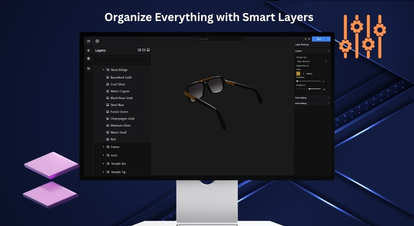
Buduj swoje opcje (warstwy + siatki + kontrolki)
Użyj panelu Warstwy, aby tworzyć grupy, podgrupy i warstwy opcji. Przypisz siatki do opcji i używaj ikon/etykiet, aby określić, jak wybory pojawiają się na frontendzie.
Dodaj opisy dla jasności i zachowaj Doświadczenie intuicyjne.
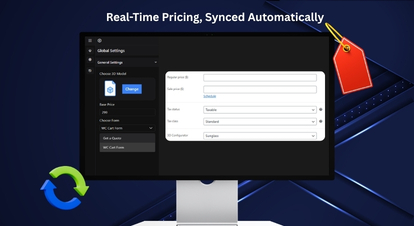
Połącz WooCommerce + Konfiguruj ceny
Wybierz produkt WooCommerce i ustaw cenę bazową w ustawieniach globalnych. Włącz Ceny w czasie rzeczywistym oraz Ustalanie cen opartych na warstwach w razie potrzeby.
Konfiguruj Ustawienia walutowe Globalnie, więc wszystkie konfiguratory pozostają spójne.
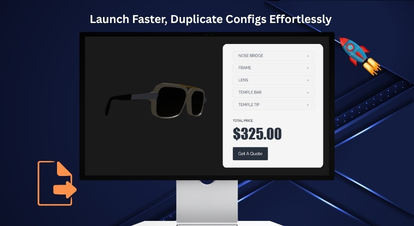
Publikuj, testuj i skaluj z importem/eksportem
Publikuj swój konfigurator i zweryfikowaj przepływ od końca do końca (Konfiguruj → koszyk → kasa). Zastosowanie Eksport (JSON/ZIP) aby zapisać konfiguratory oraz Import aby używać ich ponownie na różnych stronach.
To jest najszybszy sposób startu Nowe produkty bez konieczności odbudowy od zera.
Instalacja i aktywacja WP 3D Configurator
Prześlij ZIP wtyczki z WordPress → Plugins lub przesłaj przez FTP. Aktywuj go, a zobaczysz nowy plik "3D Configurator" menu w Twoim panelu WordPress.
Jesteś już gotowy Stworzyć swój pierwszy konfigurator.
Stwórz nowy konfigurator 3D (Upload GLB)
Kliknij Dodaj nowy konfigurator 3D i przesłać swoje GLB model (wymagany). Dodaj nazwę konfiguratora i wygeneruj konfigurator.
Wskazówka: GLB jest zalecane, ponieważ pakuje model + tekstury w jednym pliku.
Buduj swoje opcje (warstwy + siatki + kontrolki)
Użyj panelu Warstwy, aby tworzyć grupy, podgrupy i warstwy opcji. Przypisz siatki do opcji i używaj ikon/etykiet, aby określić, jak wybory pojawiają się na frontendzie.
Dodaj opisy dla jasności i zachowaj Doświadczenie intuicyjne.
Połącz WooCommerce + Konfiguruj ceny
Wybierz produkt WooCommerce i ustaw cenę bazową w ustawieniach globalnych. Włącz Ceny w czasie rzeczywistym oraz Ustalanie cen opartych na warstwach w razie potrzeby.
Konfiguruj Ustawienia walutowe Globalnie, więc wszystkie konfiguratory pozostają spójne.
Publikuj, testuj i skaluj z importem/eksportem
Publikuj swój konfigurator i zweryfikowaj przepływ od końca do końca (Konfiguruj → koszyk → kasa). Zastosowanie Eksport (JSON/ZIP) aby zapisać konfiguratory oraz Import aby używać ich ponownie na różnych stronach.
To jest najszybszy sposób startu Nowe produkty bez konieczności odbudowy od zera.
Potrzebujesz pomocy? Nasz zespół może poprowadzić Twoją konfigurację i najlepsze praktyki.
Porozmawiaj z naszymi ekspertamiWooCommerce 3D Product Configurator — Brak oddzielnych paneli rozdzielczych. Brak cen za każde miejsce. Brak zależności dodatkowej.
WP 3D Configurator został zaprojektowany tak, aby działać bezpośrednio w WordPressie i łączyć się z WooCommerce, zapewniając płynny przepływ zakupów.

Uzyskaj wycenę – integracja
Przekształć skonfigurowane komplementy w zapytania o wyceny — idealne dla zapytań o wysokiej wartości i B2B. Rejestruj wymagania w uporządkowanym formacie, aby Twój zespół sprzedaży mógł szybciej reagować.

Integracja z WooCommerce
Synchronizuj konfiguracje z koszykiem i kasą – dzięki czemu zakupy przebiegają bez problemów. Pozwól klientom dokończyć zakupy bez opuszczania Doświadczenia WooCommerce.

Kontakt z formularzem 7 Integracja
Zbieraj leady bezpośrednio w WordPressie — bez dodatkowych narzędzi czy skomplikowanej konfiguracji. Zbieraj kluczowe informacje wraz z konfiguracją, aby efektywnie kwalifikować zapytania.
Uzyskaj wycenę – integracja
Przekształć skonfigurowane komplementy w zapytania o wyceny — idealne dla zapytań o wysokiej wartości i B2B. Rejestruj wymagania w uporządkowanym formacie, aby Twój zespół sprzedaży mógł szybciej reagować.
Integracja z WooCommerce
Synchronizuj konfiguracje z koszykiem i kasą – dzięki czemu zakupy przebiegają bez problemów. Pozwól klientom dokończyć zakupy bez opuszczania Doświadczenia WooCommerce.
Kontakt z formularzem 7 Integracja
Zbieraj leady bezpośrednio w WordPressie — bez dodatkowych narzędzi czy skomplikowanej konfiguracji. Zbieraj kluczowe informacje wraz z konfiguracją, aby efektywnie kwalifikować zapytania.
3D Product Configurator Pro dla WooCommerce Różne branże
WP Configurator pasuje do każdego sklepu WooCommerce sprzedającego produkty z wieloma opcjami, ulepszeniami lub komponentami.
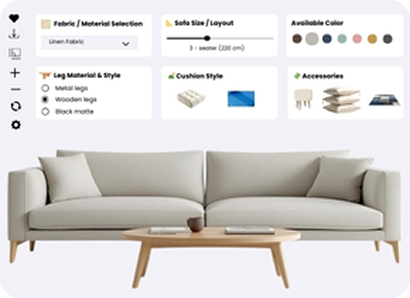
Meble i dom (moduły, tkaniny, wykończenia)
Pozwól klientom skonfigurować moduły, tkaniny, wykończenia i układy przed zakupem.
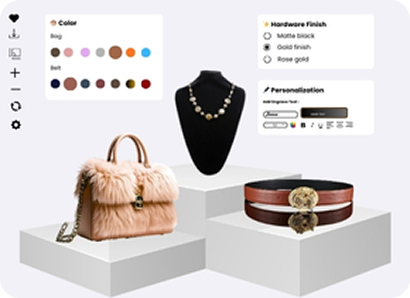
Moda i luksus (materiały, szycie, monogramy)
Oferuj materiały, szycia i monogramy z nowoczesnym, prowadzonym procesem personalizacji.
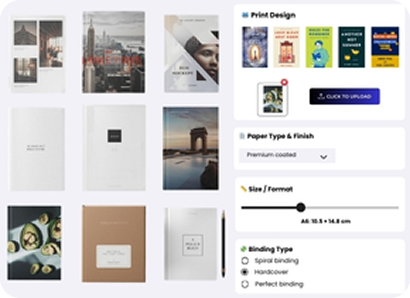
Druk (próbki, przesyłania, wariacje)
Uchwyćcie dokładnie przesłane przesłania, próbki i szczegóły wariacji — aby każde zamówienie było gotowe do produkcji.
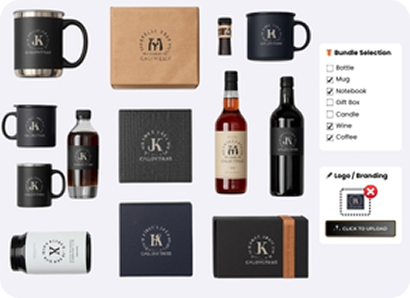
Gadżety i prezenty (logotypy, grawery, pakiety)
Włącz logotypy, grawerowanie i pakiety, jednocześnie utrzymując prostą personalizację przy finalizacji zamówienia.
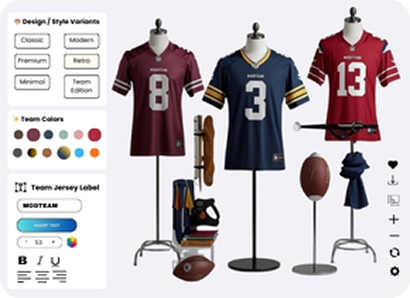
Sport i fitness (komponenty, rozmiary, akcesoria)
Sprzedawaj rozmiar, komponenty i dodatki z zasadami kompatybilności, aby zapobiec błędnym buildom.
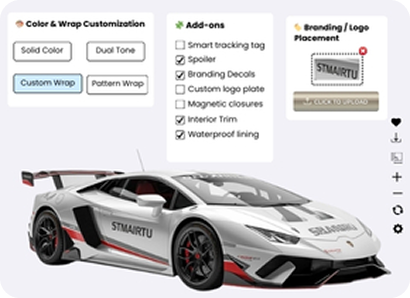
Akcesoria samochodowe (pakiety wyposażenia, dodatki)
Konfiguruj wersje wyposażenia, ulepszenia i dodatki z opcjami opartymi na regułach i cenami w czasie rzeczywistym.
Meble i dom (moduły, tkaniny, wykończenia)
Pozwól klientom skonfigurować moduły, tkaniny, wykończenia i układy przed zakupem.
Moda i luksus (materiały, szycie, monogramy)
Oferuj materiały, szycia i monogramy z nowoczesnym, prowadzonym procesem personalizacji.
Druk (próbki, przesyłania, wariacje)
Uchwyćcie dokładnie przesłane przesłania, próbki i szczegóły wariacji — aby każde zamówienie było gotowe do produkcji.
Gadżety i prezenty (logotypy, grawery, pakiety)
Włącz logotypy, grawerowanie i pakiety, jednocześnie utrzymując prostą personalizację przy finalizacji zamówienia.
Sport i fitness (komponenty, rozmiary, akcesoria)
Sprzedawaj rozmiar, komponenty i dodatki z zasadami kompatybilności, aby zapobiec błędnym buildom.
Akcesoria samochodowe (pakiety wyposażenia, dodatki)
Konfiguruj wersje wyposażenia, ulepszenia i dodatki z opcjami opartymi na regułach i cenami w czasie rzeczywistym.
Gotowy, by uruchomić swój konfigurator produktów 3D w WooCommerce?
Buduj interaktywne doświadczenia personalizacji 3D w WordPressie, łącz je z WooCommerce i skaluj się szybciej dzięki workflowom importu/eksportu.
Kontrola administracyjna i Rozwój biznesu
Uruchom konfigurator jak produkt — a nie delikatny eksperyment.

Dashboard z logiem błędów
Utrzymuj stabilność swojej strony dzięki Dashboardowi Log Błędów dla szybkiego debugowania.

Optymalizacja SEO
Popraw organiczną widoczność dzięki optymalizacji SEO, która łączy wiele produktów z jednym konfiguratorem.

Analityka
Podejmuj mądrzejsze decyzje, śledząc zachowania i wyniki użytkowników za pomocą Analityki.
Wkrótce
Dashboard z logiem błędów
Utrzymuj stabilność swojej strony dzięki Dashboardowi Log Błędów dla szybkiego debugowania.
Optymalizacja SEO
Popraw organiczną widoczność dzięki optymalizacji SEO, która łączy wiele produktów z jednym konfiguratorem.
Analityka
Podejmuj mądrzejsze decyzje, śledząc zachowania i wyniki użytkowników za pomocą Analityki.
Wkrótce
Zobacz na żywo doświadczenie WooCommerce 3D Configurator
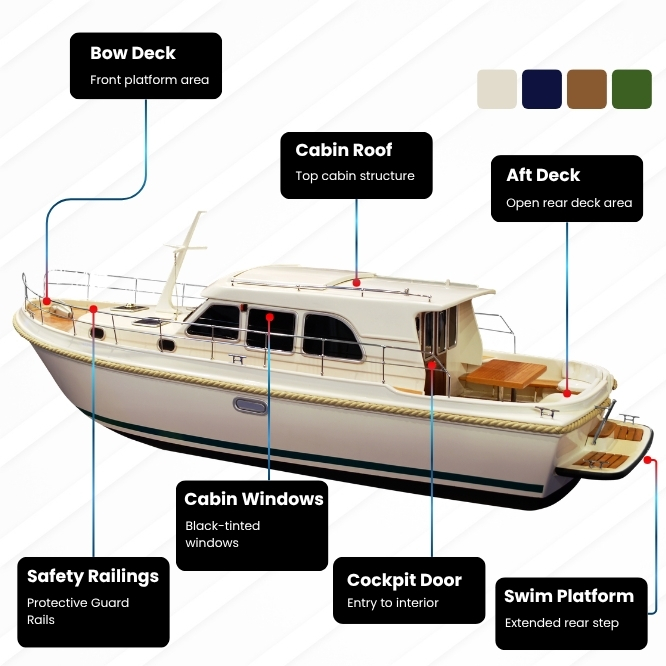
Przestań zgadywać, jak to będzie wyglądać. Zobacz, jaki przepływ aplikacji będą korzystać Twoi klienci. Instrukcje konfiguracji, zasady kompatybilności zapobiegające nieprawidłowym kompilacjom, aktualizacje cen na żywo, dodawanie do koszyka i kasa WooCommerce oraz wiele więcej.

100% gwarancja zwrotu pieniędzy bez ryzyka
Jesteś w pełni chroniony naszą 100% Gwarancją Zwrotu Pieniędzy. Jeśli nie będziesz całkowicie zadowolony w ciągu 15 dni od zakupu, możesz otrzymać pełny zwrot pieniędzy.
3D Product Configurator dla najczęściej zadawanych pytań WooCommerce
Czym jest konfigurator produktów 3D?
Konfigurator 3D pozwala klientom dostosować produkt i natychmiast zobaczyć zmiany, wybierając takie opcje jak kolory, materiały i części. Pomaga klientom kupować złożone produkty z większą pewnością siebie.
Czy obsługuje logikę warunkową i zaawansowane ograniczenia?
Tak, pozwoli pokazać/ukryć/wyłączyć opcje na podstawie reguł, aby zapobiec nieprawidłowym kombinacjom i uprościć UX.
Jaki format pliku jest wymagany dla konfiguratora 3D?
Aby stworzyć konfigurator 3D, musisz przesłać plik GLB . Pliki PNG są zalecane do tekstur lub nakładek.
Czy mogę użyć przepływu wycen zamiast bezpośredniego zamówienia?
Tak. Wtyczka obsługuje ścieżkę Pobierz ofertę dla zapytań o wysokiej wartości i B2B.
Czy obejmuje zarządzanie akcjami i analizę?
Zarządzanie zapasami i analityka pojawią się wkrótce w ramach planu działania konfiguratora 3D.
Jakie inne funkcje spodziewane są w przyszłości?
Nieustannie rozwijamy 3D Product Configurator Pro, nasz zaawansowany konfigurator produktów WooCommerce. Od momentu pierwszego wydania wprowadziliśmy następujące funkcje:
- Selektor kolorów
- Pobieranie obrazu z kanwy
- Pobieranie podsumowania w formacie PDF
- Przełączanie widoczności
- Integracja z Contact Form 7
- Funkcja udostępniania
- Zamiana siatek
- Logika warunkowa
- Zaawansowane sterowanie 3D (renderowanie, oświetlenie, kamera i scena)
Poniższe funkcje są planowane i będą stopniowo udostępniane w przyszłych aktualizacjach:
- Rzeczywistość rozszerzona (AR) Umożliwienie klientom wizualizacji skonfigurowanych produktów w ich rzeczywistym otoczeniu przed zakupem.
- Wycena oparta na zakresach i formułach Umożliwienie dynamicznego obliczania cen na podstawie wymiarów, ilości lub niestandardowych formuł.
- Logika warunkowa Automatyczne wyświetlanie lub ukrywanie opcji konfiguracji na podstawie wyborów użytkownika.
- Zarządzanie zapasami Zarządzanie stanami magazynowymi konfigurowalnych komponentów i opcji.
- Analityka Śledzenie interakcji użytkowników, popularnych konfiguracji i zachowań klientów.
- Presety inspiracji produktowych Udostępnianie gotowych szablonów konfiguracji, które inspirują klientów i przyspieszają proces zakupowy.
Czy mogę dodać konfigurator produktów WooCommerce 3D do mojego sklepu bez kodowania?
Tak. WP Configurator jest stworzony dla WordPressa i zaprojektowany do zarządzania z panelu administracyjnego z intuicyjnym interfejsem.
Jakie opcje cenowe są obsługiwane?
Dostępne są ceny w czasie rzeczywistym oraz warstwowe, natomiast wkrótce pojawią się ceny oparte na zakresie i formułach dla scenariuszy szytych na miarę i złożonych cen.
Czy klienci mogą udostępnić swoją konfigurację przed zakupem?
Tak. Udostępnij konfigurację pozwala klientom udostępniać skonfigurowany produkt za pomocą linku w celu zatwierdzeń i szybszych decyzji.
Czy konfiguracja będzie działać z koszykiem WooCommerce i kasą?
Tak. Integracja z WooCommerce umożliwia płynne zakupy od konfiguracji aż po finalizację kasy.
Jak połączenie wielu produktów WooCommerce z jednym konfiguratorem poprawia SEO?
Łączenie wielu produktów WooCommerce na jednej stronie konfiguratora konsoliduje wartość SEO, zamiast rozpraszać ją na kilka oddzielnych stron. Ruch, linki wewnętrzne i sygnały pozycjonowania z różnych stron produktów wskazują na ten sam konfigurator, wzmacniając jego pozycję w wyszukiwarkach. Pomaga to stronie konfiguratora lepiej pozycjonować się na odpowiednie słowa kluczowe i przyciągać więcej wykwalifikowanego ruchu organicznego.
Czym 3D Product Configurator Pro różni się od 2D WP Configurator Pro?
3D Product Configurator Pro został stworzony do interaktywnej personalizacji 3D z wykorzystaniem modeli GLB, natomiast WP Configurator 2D Pro jest zaprojektowany do szybkiej konfiguracji wizualnej z użyciem warstwowych obrazów (PNG) – idealnego, gdy potrzebujesz lekkiego, szybkiego do uruchomienia customizera produktu bez modeli 3D.