



On this page
A complex product configurator is a versatile tool designed to streamline the customization of sophisticated products, whether it’s construction materials, biotech equipment, machinery, furniture, automotive products, or residential units. Unlike simpler product customizers, complex configurators are designed to manage numerous product variations, dependencies, pricing rules, and configuration requirements without overwhelming the customer.
As businesses increasingly offer personalized products, manually managing every possible combination becomes difficult. Customers may need to choose from different sizes, materials, components, colors, accessories, technical specifications, and other options. When these choices depend on one another, a traditional product page may not be enough.
How Does a Complex Product Configurator Work?
The configuration process combines visual tools, rules-based systems, pricing logic, and efficient workflows to create a seamless customization experience.
Instead of asking customers to understand every technical detail of a product, a complex product configurator organizes the process into manageable steps.
Here’s how it works:
Customers interact with visual product elements to explore and customize different options. Depending on the product and requirements, this experience can be delivered through 2D or 3D visualization.
For example, a customer configuring a piece of furniture could select the upholstery, color, legs, accessories, and other components while viewing the product preview.
Visual feedback is particularly important for customized products because customers want confidence that the final product will look the way they expect.
-
Rules & Logic
Complex products often contain dependencies between options. Not every component can work with every other component.
Predefined rules and conditional logic help ensure that customers can only select valid combinations.
For example, selecting a particular product model may automatically display compatible accessories while hiding options that are unavailable. This prevents customers from accidentally creating configurations that cannot be manufactured, supplied, or delivered.
Rules can also simplify the interface by showing customers only the choices that are relevant to their current configuration.
-
Automated Outputs
Once the customer completes the configuration, the system can generate relevant information based on their selections.
Depending on the business requirements, this may include an updated product price, configuration summary, quote request, or order information.
Automating these outputs reduces the need for sales teams to manually interpret every customer request. It also creates a more consistent process from product selection to purchase.
By combining visual configuration, business rules, and automated outputs, tools like WP Configurator Pro empower businesses and customers alike.
Benefits of a Visual Product Configurator
Using a visual product configurator offers several advantages for buyers and sellers. It doesn’t simply make a product page look more interactive; it can also simplify the decision-making process and reduce the complexity associated with customized products.
1. Enhanced Understanding
Customers gain a clearer understanding of available product options when they can see configurations visually.
Instead of reading technical descriptions and trying to imagine the final result, shoppers can interact with different choices and immediately understand what they are selecting.
This is especially useful for products with many variations. A visual configurator can organize options into logical groups, making the customization process easier to follow.
2. Increased Customer Confidence
Customization can sometimes create uncertainty. Customers may hesitate because they are unsure what the final product will look like or whether they selected the right combination.
Real-time configuration previews can reduce this uncertainty.
When customers can see their selections reflected in the product preview, they have more confidence in what they are ordering. This can be particularly valuable for high-value products where customers spend more time evaluating their purchase.
WP Configurator themes and visual configuration tools can help businesses create an experience that feels more interactive and transparent.
3. Faster Sales Cycles
Complex customization often requires communication between customers, sales representatives, designers, and technical teams.
A product configurator can reduce some of this back-and-forth by allowing customers to configure products directly on the website.
Instead of sending multiple emails to clarify colors, components, sizes, or accessories, customers can make their selections through a guided configuration process.
This can help sales teams spend less time answering repetitive questions and more time working with qualified customers.
4. Reduced Errors
Manual configuration creates opportunities for mistakes.
A customer may select incompatible options, a sales representative may enter the wrong specification, or a quotation may contain an incorrect price.
Automation helps reduce these risks.
Configuration rules can prevent invalid combinations, while automated pricing and configuration summaries help ensure that the information submitted by the customer accurately reflects their selections.
For businesses handling customized orders, reducing configuration errors can save time and prevent costly revisions.
Choosing Between 2D and 3D Product Configurators
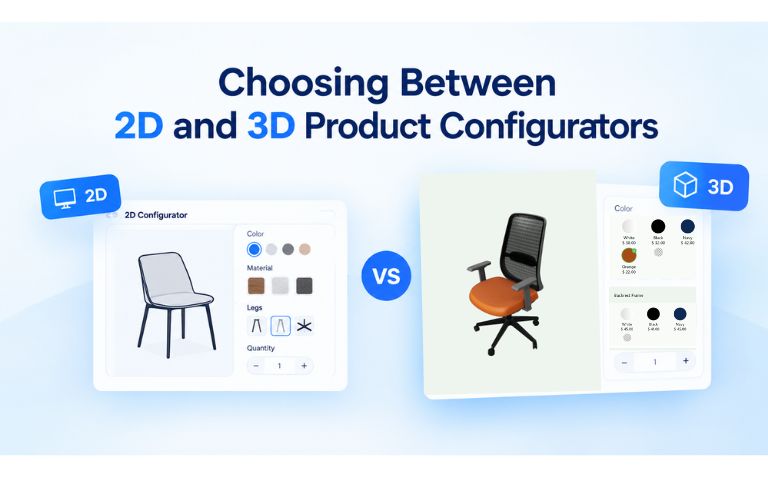
2D Product Configurators
A 2D configurator uses layered images and multiple product views to let customers customize colors, materials, components, patterns, text, and other options. It can be a practical choice for products where customers need clear visual comparisons without requiring a fully interactive 3D environment.
2D configurators can offer:
- Fast and responsive product visualization
- Multiple views and product angles
- Flexible layer-based customization
- Efficient implementation for image-based products
- Support for complex product options and configurations
3D Product Configurators
A 3D configurator provides an interactive three-dimensional representation of a product. Customers can typically rotate, zoom, and explore the product while changing materials, colors, components, and other options in real time.
3D configurators can be particularly useful when customers benefit from seeing the product from different angles or when depth, shape, dimensions, and spatial relationships are important to the purchasing decision.
3D configurators can offer:
- Interactive 360-degree product views
- Realistic visualization of materials and components
- Real-time product interaction
- A more immersive customization experience
- Greater visibility into the shape and structure of a product
Which One Is Right for Your Business?
There is no single solution that works for every product. A 2D configurator may be well suited to businesses that rely on layered images, multiple product views, colors, patterns, and straightforward visual customization. A 3D configurator may be more appropriate when customers need to interact with the product in three dimensions or understand its shape, depth, and components.
The decision should be based on factors such as:
- Product complexity: Consider whether customers need 2D views or an interactive 3D representation.
- Visual requirements: Determine how important depth, angles, materials, and realistic product interaction are.
- Customer expectations: Consider the type of shopping experience your audience expects.
- Performance: Evaluate the devices and connection speeds your customers are likely to use.
- Budget and development requirements: Consider the resources required to create and maintain the desired experience.
For some products, 2D provides everything customers need. For others, 3D can deliver a more immersive and informative experience. In some cases, businesses may benefit from using both approaches for different products or use cases.
Pro Add-Ons for Enhanced Functionality
Businesses with more advanced customization requirements can extend their configurator with additional functionality.
-
Short codes for Elementor and WP Bakery
These add-ons provide additional flexibility for businesses using popular WordPress page builders.
They can help businesses create custom layouts and integrate product configurators into existing website designs.
-
Conditional Logic
Conditional logic is particularly valuable for complex products.
It allows configuration options to respond to previous selections. For example, choosing one product type can reveal specific options while hiding selections that are not compatible.
This keeps the interface cleaner while helping customers create valid configurations.
-
Custom Image Upload
Custom image uploads allow customers to add their own images, logos, artwork, or other visual assets.
This can be useful for personalized merchandise, signage, promotional products, apparel, packaging, and other products where customers want to add their own designs.
-
Custom Text
Custom text functionality gives customers the ability to product personalization with names, messages, numbers, labels, or other text elements.
Together, these add-ons allow businesses to create more personalized and flexible configuration experiences.
Style Options for WP Configurator
The appearance of a configurator can have a significant impact on usability.
Customers should be able to understand available options quickly without feeling overwhelmed by the number of choices.
WP Configurator provides different interface styles designed for different product configuration requirements.
Style 1: Convenient Side-Panel Options
A side-panel interface keeps product options organized while allowing customers to view the main product preview.
This layout works well when customers need to move between different configuration categories while maintaining visibility of the product.
Accordion Style 2: Advanced Sub-Group Categories
Accordion-style layouts can help organize large numbers of options into logical groups.
For example, a furniture configurator could separate options into categories such as:
- Product type
- Size
- Materials
- Colors
- Components
- Accessories
Customers can expand the relevant category when they need to make a selection, reducing visual clutter.
Choosing the right configuration style helps businesses balance functionality with a clean and intuitive user experience.
eCommerce Integration for Growth
Integrating WP Configurator Pro with an eCommerce platform such as WooCommerce allows businesses to bring product customization directly into their online sales process.
This can create benefits throughout the customer journey.
Improved Order Accuracy
Customers select their own product options, while configuration rules can help prevent invalid combinations.
This reduces the risk of errors caused by manually transferring customization requirements between emails, forms, spreadsheets, and order systems.
24/7 Availability
An online product configurator allows customers to customize products whenever they want.
Unlike traditional sales processes that depend on business hours or sales representatives, an online configurator can provide a self-service experience around the clock.
This is particularly valuable for businesses serving customers across different countries and time zones.
Scalability
As the number of orders increases, manually managing customized products can become difficult.
A product configurator helps automate parts of the process so businesses can support more customers without requiring the same increase in manual configuration work.
For growing WooCommerce stores, this can make product customization more scalable.
Install WP Configurator Pro Today!
Conclusion
A complex product configurator can simplify customization, improve customer confidence, reduce configuration errors, and streamline the path from product selection to purchase.
Whether you choose a 2D or 3D configurator depends on your product, customization requirements, customer expectations, and desired shopping experience. 2D visualization can provide an efficient and flexible way to present image-based product customization, while 3D visualization can deliver a more immersive experience for products where depth, shape, and interactive viewing are important.
With WP Configurator, businesses can explore visual configuration solutions that match their specific products and requirements, whether they need the flexibility of 2D configuration or the interactive experience of 3D.


WPConfigurator Dev
Archie is a WordPress specialist with a strong background in technical support, website customization, and e-commerce solutions. He focuses on helping businesses improve their platforms through efficient configurations and seamless integrations. At WPConfigurator, he assists clients with setup, troubleshooting, and optimizing their overall website experience. He is highly proficient in WordPress and various modern web tools.
You might also enjoy


100% No-Risk Money Back Guarantee
You are fully protected by our 100% Money Back Guarantee. If you aren’t completely satisfied within 15 days of purchase, you’re more than welcome to a full refund.
Frequently Asked Questions (FAQ’s)
What is a complex product configurator?
A complex product configurator is an advanced tool that enables users to tailor products with numerous customizable features, options, components, and specifications.
It intelligently manages dependencies and constraints between components, ensuring that selected options remain compatible and aligned with predefined business rules.
This system simplifies the customization process, enhances the user experience, and minimizes configuration errors, making it ideal for industries with highly customizable or modular products.
Why choose WP Configurator Pro?
WP Configurator Pro provides features such as unlimited layers, WooCommerce integration, visual product configuration, customizable styles, request-a-quote functionality, and additional add-ons for advanced customization.
It is designed for businesses that want to add product configuration capabilities to their WordPress and WooCommerce websites.
What’s the difference between 2D and 3D configurators?
A 2D configurator uses layered images or visual assets to display product customization, while a 3D configurator allows customers to interact with a three-dimensional product model.
2D configurators can be more accessible, cost-effective, and quicker to deploy, making them suitable for many eCommerce businesses.
3D configurators may be more appropriate when customers need to understand complex shapes, dimensions, or spatial relationships.
How does it integrate with eCommerce?
A product configurator can connect the customization experience with an eCommerce platform such as WooCommerce.
Customers can configure products, review their selections, see pricing where applicable, and proceed toward an order or quote request.
This creates a more streamlined buying experience while helping businesses reduce manual configuration and pricing errors.